Ensuring access to the &money Financial Platform Management UI
To give administrative users the required access to login to the solution, the following steps need to be taken. Please note accessing these URLs will give consent and create the Enterprise Applications for you in your AAD. After clicking 'Accept', you might see the following Error: "Sorry, but we're having trouble signing you in.", however, the Enterprise Applications will still be created.
Replace the placeholder TENANT_ID_FOR_BANK in the URLs. Access the URLs to create the Enterprise Applications in your AAD:
Environment – Test:
API app registration
UI app registration
Environment - Production:
API app registration
UI app registration
Role Assignment for the Management UI
For the new Entra Enterprise Application named BookingPlatform Mgmt API, the users who need to be able to use the new Booking Platform Management system must be assigned to one or more of the following roles (the list is sorted with permissions in ascending order):
Customer - Not relevant for the Management UI
Employee/System - Not relevant for the Management UI
Manager - A manager can access the Management UI and configure service groups and competence groups
Configurator - All permissions that the
Managerrole has, and can in addition perform Meeting configuration and Portal configuration.Admin - All permissions that the
Configuratorrole has, and can in addition access the Logs (Insights)
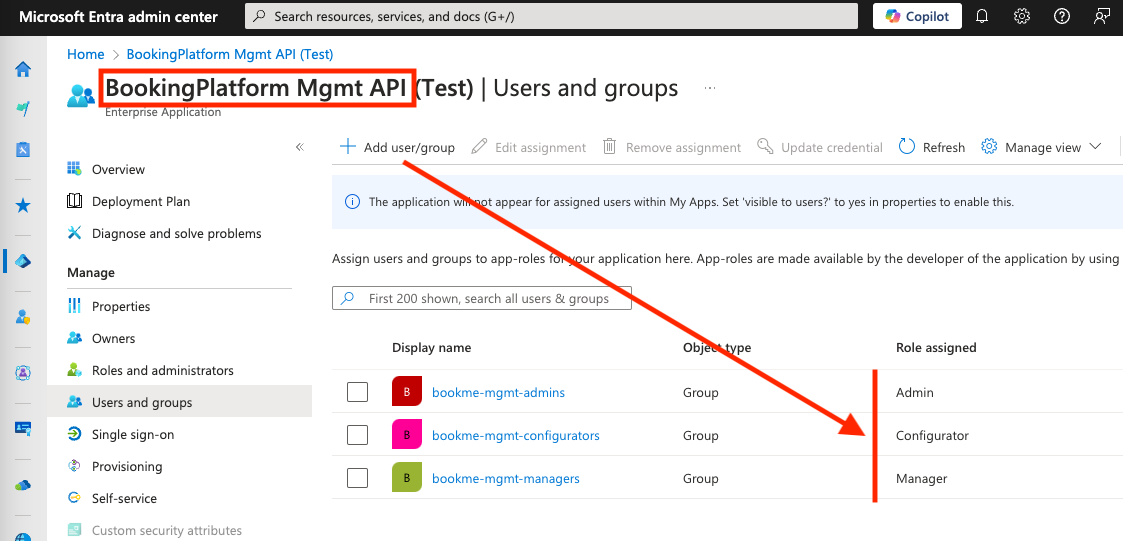
Example of Role Assignments
After mapping users- or groups to the Booking Platform application roles, the Entra Admin center for the BookingPlatform Mgmt API enterprise application should look similar to the screenshot below:
Access the &money Financial Meeting Platform Management UI
Once the enterprise application and its permission has been approved for the tenant and a user has been assigned one of the roles mentioned above you can try logging in using this url:
Test: https://self.test-env.booking.andmoney.dk/
Production: https://self.booking.andmoney.dk/